Monitoring Support Ticket Age

There are various ways you can monitor how effective your support process is. You can record the number of tickets opened and closed, you can keep track of queue counts, or you can ask your customers!

When I develop a KPI I want a simple numerical value, something I can examine, track, and use to decide whether we are improving or struggling.

One of my favorite statistics to measure is the average age of tickets in the queue. The benefits of this are:

  • You can calculate it at any time and don’t need to measure tickets added and closed for a prolonged period of time.
  • You can get a feel for how long tickets are sat waiting for a resolution.

In other words it gives a rough value of how long a customer can expect to wait before you respond to them.

However, as with all measurements the act of measuring it can change the result. In our world this can have a very direct effect, if you only focus on how old tickets are you encourage a First-In-First-Out approach (as Developers and Support Analysts fight over the oldest tickets in an effort to bring down the average). This can undermine your attempts at ticket triage and prioritising.

This is a known risk when working out KPIs for your team. KPIs are often easy to manipulate (in our example a developer choosing to pick up an old P4 ticket over a new P1). It’s a risk yes, and any skilled problem solver will quickly work out how to game this measurement if they need to. However, I would hope you have enough confidence in your team to feel confident they will not to ignore urgent tickets for the sake of an arbitrary numerical goal.

What’s important is identifying the behaviours you want to encourage in your team. One of my first priorities in any role is to give customers a good level of service (and make sure they aren’t kept waiting too long for answers and support). If I want to achieve that I need a value which helps me record it, until I find a better one ticket age is my KPI of preference.
What KPIs do you use? Make your suggestions in the comments below…
Creating a Valuable Signoff Process

We all have them, a series of tests which need to be run before a build is considered good enough to be released to a customer. You may have different scripts for different stages of release (Alpha/UAT/Live), you may have different processes depending on the severity of any bugs found. Whatever your process I’m sure we can all agree that your signoff process is one of the most important pieces of your development puzzle and one of the most vital to get right in order to avoid issues further down the line.

But what makes a signoff process good? These are the things I believe a good signoff process needs to achieve:

  • Detect all unknown bugs in all critical features
  • Quick and easy to complete

Clearly these are at odds, if you want to find every bug then you’ll need to invest significant time! Let’s look at why each of these are so important before we try to find a solution.

The first one is fairly obvious, the most critical parts of your system are the ones which will generate the most urgent Support Tickets. In order to minimise those stressful late nights we need to validate that those areas of the system are as robust as possible.

But why the speed? Why not simply run through every test and permutation before each release (assuming you don’t mind driving your QA team mad)? In this world of Agile Development and quick turnarounds it’s becoming more important than ever to test and release quickly. After all, I mentioned in my previous post about Sprint Planning I suggested that you should aim to both develop and test your new features in each Sprint. In order to maximise your development potential you need to make your signoff process as efficient as possible.

So how do we do this? The key is to target your testing effectively. You need to work with your Product Owner to identify the Critical Functionality which must not fail, these form the basis of your signoff scripts. Other areas of the system can be tested on a rotational basis or when changes are made.

This prioritisation of the most critical functionality guarantees that the vital happy paths are always tested. This leaves more time for the QA team to expand their efforts into other areas while the developers are coding new features. By targeting your signoff scripts you can guarantee a high quality build without the lengthy delays which come from a bloated signoff process.

The Importance of Testing Early

I recently had a conversation with a Development Manager at a company based in Leeds. We were discussing when to involve the QA Team in a release we were planning, I argued that there was little value in wasting the QA guys’ time until we were feature complete. After all, everything was still subject to change and they’d only have to repeat those test again at a later date.

Ironically I now hold the opposite view.

If you walked up to me today and asked at what stage of development you should bring QA resource into a project I would always advise that as soon as the developers start coding it’s too late.

Your QAs are not automated test machines, I can crank out a few Selenium scripts to test a UI during my lunch hour! Your QA team are there to ensure that the features you deliver are the highest quality they possibly can be. So when does quality begin? I would argue in the design phase!

I’m currently working with a QA who, for a variety of reasons is trying to work out all a feature’s permutations eighteen months after the design was originally done. He’s documenting these, generating Functional Tests for them, and raising bugs where required. This is incredibly time consuming and takes lots of time from him, a development resource, and the Product Owner. Imagine if he’d had the opportunity to work this out before development work had begun!

The key here is to allow you Product Owner, QA, and Developer to create the spec together. The developer sets to work and the QA begins creating their functional tests, as soon as the feature is code complete your QAs are ready to go!

So, my original concern was that our testers would have to continue to test over and over again. Yes, this is a risk, however, when would you rather be alerted to any issues… as the developer is adding finishing touches, lining up buttons and tidying Unit Tests, or six weeks after they’ve finished? I know which I’d prefer!

This is where the distinction between Functional Tests and Signoff Tests becomes important. Functional Tests are used to test every permutation of a feature, to verify it against the spec, and to perform regression testing after substantial change. Signoff Scripts are to protect your critical functionality. Use your Functional Tests early to ensure that the newly created feature behaves according to spec, use your Signoff Scripts to verify your functionality before a release.

Get your QAs involved in your spec documents, organise your Sprint so they create tests while the developer codes, and get timely feedback on your features while you’re still in a position to fix them.

Measuring Sprint Velocity is Useless Unless You Ship!

I’ve recently been reading The Goal by Eli Goldratt, in it Alex Rogo (the Plant Manager) boasts to an old teacher of his that the new robots they’ve installed have greatly increased their efficiency. The Yodaesque Jonah then promptly proves his data worthless and sets Alex on the path to enlightenment.

What struck me however was how clearly this mirrors the software industry. The Goal has been the go-to book for managers for years but only with the relatively recent release of books like The Phoenix Projext have the applications to software industries been recognised.

It’s a well established idea to model a software development team like a factory. Time and money goes in, features and fixes come out. In the story Alex was delighted that his robots had given him an increased efficiency for making a particular part of the process, it was only when Jonah pointed out that the robots did not result in any increase in sales that he saw the problem in his logic.

So, let’s imagine that our software business is Alex’s factory. We’ve brought in a robot to do the work of the Development Team and Sprint Velocity has gone up from 100 Story Points to 300. As the Development Manager you get to pat yourself on the back, celebrate your success, and go home at the end of the day.

But what happens to your release at the end of your Sprint? Is your product stacked up on your factory floor awaiting the next machine (perhaps your deployment or infrastructure team)? Or have you sold it and added value to your business?

This may seem like false measurement, your numbers are telling you that you’re delivering but the reality is very different. The truth however is even worse, unshipped features are the software equivalent of Work in Progress, they’re the half finished products sat on your factory floor taking up time and space. Until your business can deliver them they’ll continue to come back and haunt you, injecting unplanned work into your Sprints and sucking time out of your Development Team.

So, If your Sprint Velocity measurements only take into account the work pushed through your Development Team then you’re not measuring the value you’re adding to the business, you’re making the same mistake as Rogo and only considering one part of the system. You may be getting great results, but are you helping achieve the goal!?

The Single Biggest Standup Mistake

We all do them, Daily Standups are the quintessential activity of a Scrum Team. Each morning the group gathers, discusses what they did yesterday, and what they plan to do today. The tone is monotone and everyone sips away at their thick treacle-like coffee in an attempt to remain upright while a few of the younger developers attempt to conceal hangovers which would force anyone of your advancing years to cower under a desk.

For me the daily stand up is one of the easiest Scrum practices to implement and therefore is often forced upon a team so they can claim that they’re “agile”.

As with many Scrum components the value is not in the compulsory attendance but in the enlightenment when a member of team suddenly has a lightbulb moment and understands why a practice is of use to them.

For me that moment came when I realised that the Yesterday and Today section of a Team Member’s speech is simply window dressing. It’s interesting certainly, it may even help the Team Lead or Scrum Master measure burndown but the real value of a Daily Standup is in the often neglected Impediments section.

During our working day we encounter and resolve countless impediments, those which prove to be more troublesome are raised in the standup where (more often than not) time pressed colleagues mutter a few words of advice or encouragement before wandering back to their own tasks.

This way of raising issues actually dampens the team members’ enthusiasm for “Any Impediments”. After all why should they raise them in scrum when they could simply ask a more experienced colleague quietly, later in the day. I know I wouldn’t want to admit I was struggling to my Team Lead if there was no increased chance of getting help.

So what do I recommend?

I suggest that each Scrum Master take a pen and paper into the standup. As well as facilitating the meeting they need to capture the team’s issues and impediments. At the end of the meeting it is their job to resolve them. More often than not this will involve finding the correct people to lend assistance, be they infrastructure guys, senior developers or management.

The Daily Standup is not a progress meeting. It’s an opportunity for the entire team to come together and check that no one is struggling with an impediment which will impact the team’s ability to deliver at the end of the Sprint.

Remember that a Sprint is not about individual completion, it’s about the team and this is everyone’s opportunity to keep the group on target so they can meet their combined goals.

Why you MUST run your Unit Tests as part of your Build Process

I was browsing StackOverflow the other day (as many geeks are known to do from time to time) and read an answer which describes writing Unit Tests as being like going to the gym. Now, I’m not sure about the final few sentences about finding another job but I do really like the analogy. It’s hard when you start out but the more you do the easier it gets and the more value it adds.

Now, like going to the gym there are couple of fundamentals which if forgotten can undermine everything. Unit Tests don’t require proper warmups or cool downs but they absolutely, definitely, must be run on the build server for their real value to be exploited.

Let me explain why.

Developers are often hackers by nature, we install different things and experiment. That’s what makes us good at our job, it’s also what makes every developer’s computer slightly different so software which runs on one machine could behave very differently on another.

What’s worse, if your developer is in a rush or having a bad day they may completely ‘forget’ to execute the tests before committing code. Now, instead of vigorously tested and proven code being added to source control you’ve got a risk.

Tools like NCrunch help reduce this but the only absolutely foolproof way to ensure that all your tests are executed and passed before deployment is to get your server to run them. Missing out this vital link means you’re opening your build and deployment process up to human error, something you should be very nervous of doing.

Almost all build servers have the capability of running tests so dig out the manual and make sure that when the tests fail, the build fails!

Setting SMART Goals for your Team

Annual reviews are often one of those things we do as a box ticking excercise. It’s dull, time consuming and there are often more interesting geeky projects you’d rather be working on.

Words like SMART buzz around our brains for a few weeks and then are promptly forgotten (much like the goals) until the same time the following year when each goal is ticket off as “Done” or “No Longer Relevant”.

Surely there’s a better way?

Let’s look at what SMART stands for…

  • Specific
  • Measurable
  • Attainable
  • Relevant
  • Time Constrained

Your business may have different words but the jist is the same.

I want you to think about these words differently. Instead of writing goals for someone to achieve I want to think about User Stories. It’s reasonable to demand that any PO writing new features for the backlog should create them so they are Specific, have good Acceptance Criteria, be feasible to implement, be a valuable addition to the software, and should fit into a single Sprint.

In other words SMART is just another way of setting detailed and unambiguous instructions!

So now we know that SMART is simply a way of writing clearly let’s look at what goals you should set.

What do you expect your Team Member to be doing for the upcoming year?

This may sound like an obvious question but in my opinion annual goals shouldn’t all be about Continuous Personal Development or an arbitrary “I’d like to lean that” because these are the first things which will be abandoned when you have a tough day. Instead look at what your department goals are and propagate these through to your team.

If you have a major release coming up then set that as one of the goals. If you need to analyse system performance or memory usage then write it down. What you will find is instead of irrelevant targets which will be abandoned in favour of more pressing work your team will suddenly become accountable for getting the releases out to customers. Not only that, but they will see that their day to day tasks are being used to measure performance instead of the “Nice to Haves” which were abandoned as soon as the year hit a rough patch.

You will quickly find that most developers will much rather have a goal of “Create Offline Sync Mechanism as specified in Feature 123 before the end of January” than something vague like “Improve the Support mechanism”. For one thing there’s a lost less ambiguity as to whether it’s actually been achieved! Remember, less ambiguity means fewer awkward conversations when you come to assess goals, that has to be a good thing!

In conclusion, setting clear (or SMART) goals for your team which actually reflect the work they’re going to be doing day to day is a great way of getting investment in your department’s objectives and helping making those annual review forms much more relevant. Learning goals are good, but they shouldn’t be the core of a Team Member’s assessment.

Restructuring your Sprint to Produce Finished Software

If your company is anything like many of the teams I’ve worked with your Sprints are a planning tool used to break down monolithic projects into smaller pieces to track progress.

In the real world big releases often pressure development teams to adopt more established project management techniques to hit deadlines. A PM will nominate a certain number of weeks for development (hopefully based on estimates your developers have provided) and then subsequent time for testing, bug fixing and UAT. The Development Manager will then allocate time into those Sprints.

But wait a minute? Doesn’t Scrum team us that we should be able to produce full working software at the end of each Sprint? If that’s the case then why are we saving all of our testing and bug fixing until the end!? It feels to me as though we’re running Sprints but ignoring the line of the Scrum book which talks about finishing a Sprint with deliverable software.

In Rolling Rocks Downhill Clarke Ching calls this GETS Software (Good Enough To Ship), it’s a term I like. In his book the team would build feature after feature however at the end of each iteration they ensured the product was GETS. That meant that if something took longer than expected or their budget was cut the team would always be able to fall back on the last version.

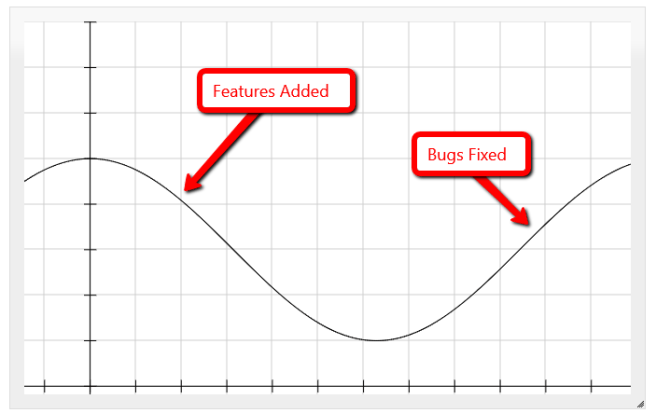
In a typical PM managed project I envisage features a development phase, when new bugs are carefully and painstakingly introduced. Then a testing and bug fixing phase, where they are removed.

waterfall_bug_flow

If however you commit less work to your Sprint, let’s say half the amount then your developer can spend the second week refining their work, working alongside the QA, designing upcoming features, and removing any bugs which are found.

This will obviously reduce your Sprint Velocity, however it will mean that whatever work is completed is completed, reasonably and as Clarke puts it GETS. However without the need for long and laborious bug fixing phases this time can often be reclaimed.

agile_bug_fixing

This approach is game changing for a number of reasons. Firstly your quality isn’t compromised, instead of a quality decline and then improvement your software stays at production quality. Second, should your customer, Product Owner, or business priorities change you can update your plans (maybe even delivering early). Surely that’s what we mean by Agile!?

Many thanks to FooPlot for the brilliant site I used to create these graphs and Jing for the screenshotting and labeling software.

The Phoenix Project Book Review

I recently read The Phoenix Project, the definitive and often referenced DevOps Business Novel by Gene Kim, Kevin Behr, and George Spafford.

I have to admit I’ve been putting off reading this book, perhaps I had some misgivings about replacing Scrum techniques with the new craze of DevOps. Having decided that I was going to invest my time I was tested once again when I realised that Bill, the book’s main protagonist is an infrastructure guy… I’m a Development Manager, I want to know what DevOps can do for do for me not what I can do for the other guys!

That however was the last time I paused before devouring the remaining 370 pages.

Bill’s first few days after his promotion are littered with disasters. He has a project to deliver, infrastructure problems to resolve, and political ambushes to endure. In other words, he’s in the situation we’ve all experienced when teams aren’t communicating and colleagues are so stacked up with their own projects and priorities that they simply can’t assist each other.

With the timely arrival of Eric, the new potential board member Bill slowly equips himself with the tools he needs to resolve his infrastructure headaches and get the Phoenix Project back on track. Eric, acting as a kind of DevOps Yoda helps Bill gain an understanding of the four different types of work, the Theory of Constraints, Systems Thinking and see the value of Automated Deployments.

There’s a nice appendix at the end which helps consolidate the ideas and explains some of the ideas away from the story. There are also some mind blowing statistics about how some of the big web companies such as Amazon, Google, and Netflix.

So would I recommend this book to others? Absolutely! In fact I have, repeatedly to friends and colleagues! Whether you’re a developer, infrastructure guru or IT manager this book will introduce you to several new ways of thinking about workload management and IT processes.

Playing with Microsoft Cognitive Services

It’s time for a little fun – inspired by Martin Kearn‘s talk at DDDNorth I fired up the Microsoft Cognitive Services Website, signed up and got myself a key for the emotion API. It didn’t take me long to get up and running!

I tried briefly using the SDK library but found some trouble with strongly typed names, deciding the abandon that approach I used the method Martin recommends on his blog and simply downloaded the json myself and parsed it.

Here’s my code:

        var _apiUrl = @"https://api.projectoxford.ai/emotion/v1.0/recognize";

        using (var httpClient = new HttpClient())
        {
          httpClient.DefaultRequestHeaders.Add("Ocp-Apim-Subscription-Key", _apiKey);
          httpClient.DefaultRequestHeaders.Accept.Add(new MediaTypeWithQualityHeaderValue("application/octet-stream"));

          //setup data object
          HttpContent content = new StreamContent(new MemoryStream(File.ReadAllBytes(filename)));
          content.Headers.ContentType = new MediaTypeWithQualityHeaderValue("application/octet-stream");

          //make request
          var response = await httpClient.PostAsync(_apiUrl, content);

          //read response and write to view
          var responseContent = response.Content.ReadAsStringAsync().Result;
          var objResponse = JsonConvert.DeserializeObject<RootObject[]>(responseContent);

          var image = Image.FromFile(filename);
          using (var gfx = Graphics.FromImage(image))
          {
            foreach (var face in objResponse)
            {
              gfx.DrawRectangle(new Pen(Color.Red, 5),
                new Rectangle(new Point(face.faceRectangle.left, face.faceRectangle.top),
                  new Size(face.faceRectangle.width, face.faceRectangle.height)));

              var text = this.GetText(face.scores);

              gfx.DrawString(text, new Font(FontFamily.GenericSerif, 64), new SolidBrush(Color.Red),
                face.faceRectangle.left + 24,
                face.faceRectangle.height + face.faceRectangle.top);
            }
          }
          this.pictureBox1.Image = image;
        }

I’m very impressed with how easy it is (in fact most of it’s being used to update the picture box in my little Winforms app!).

What do you think? Do I look about 65% surprised?

emotion_screenshot